Archive for the ‘Processing’ tag
Final of Nature of Code
Exercise week 4, Nature of Code
Here is my example using box2d, my final goal is to disappear the red cells as soon as they touch the Disease and a second one where the virus will attach to the white cells. The solution is to create a contact listener so I know the values of the collision and can create functions like destroy and attach. The code is not very easy so I haven’t been able to figure it out, even with the help of Daniel Shiffman.
After I created the world and set the variables I realized that something was missing. I thought to create walls with lines that move with time, and noise. I looked at a lot of videos of cells and processing examples and I found a wonderful example in open processing.
After you mouse clicked the noise function adds massive points into the background. The cells and the disease have problems moving faster but when the toxin is flushed, they bounce between each other graciously again.
I’m exited about better understanding the contact listener function in box2d and experimenting more.
Bellow is the applet
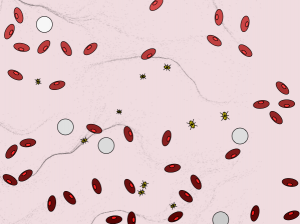
Please click on the image to the applet
Bellow is the video
Disease from Lina Maria Giraldo on Vimeo.
Rain- Big Screens Final Show
Every day is just one more day, one more baby, one more car, one more house, one more bottle. Every moment that goes by is one more piece for the puzzle. Our consumption just helps the mountain grow. Empty bottles, cups, plastic containers just become one more layer of the noise in this unfriendly city.
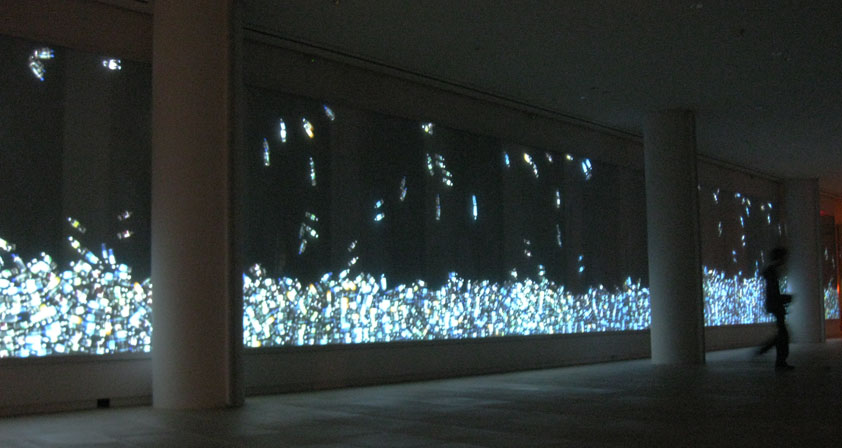
Bellow video excerpt
Rain from Lina Giraldo on Vimeo.
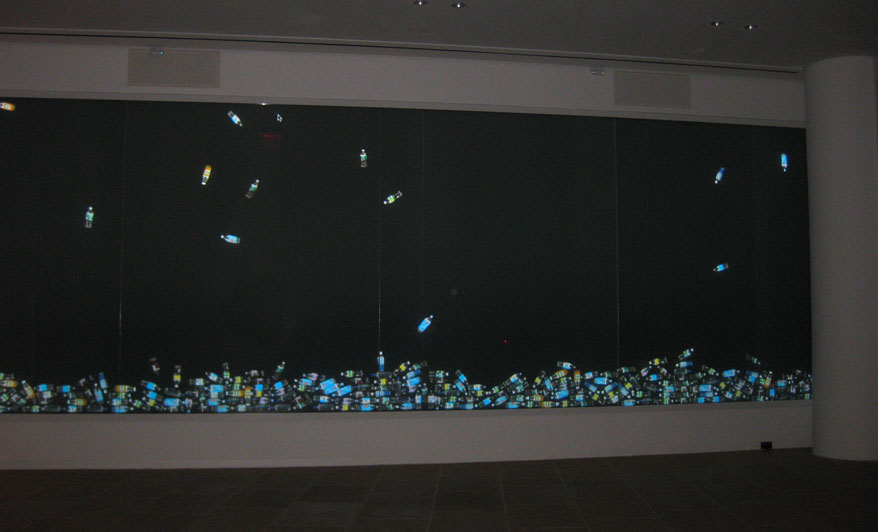
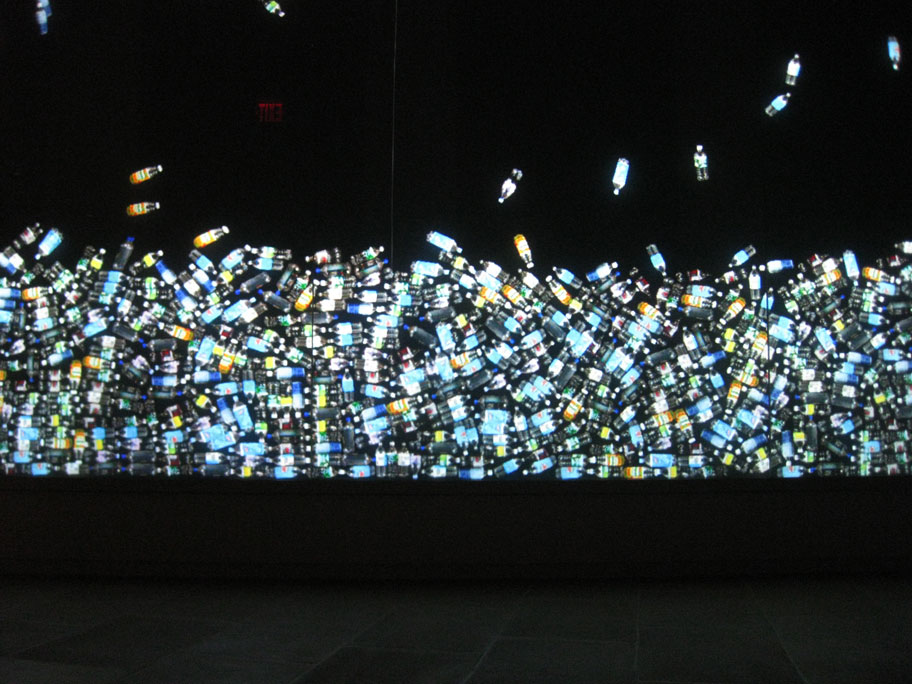
A showing of works by the students of this fall’s “Big Screens” class at ITP on IAC’s 120×12 foot video wall.
http://itp.nyu.edu/bigscreens2009/
http://itp.nyu.edu/
http://iacbuilding.com
Please RSVP to: itp.rsvp@nyu.edu
Works by:
Adi Marom
Anthony Ptak
Asli Sevinc
Elie Zananiri
Elizabeth Fuller
Eyal Ohana
Filippo Vanucci
Jayoung Chung
Lina Giraldo
Michelle Mayer
Nicholas Rubin
Sara Bremen
Soojung Huh
Sue Syn
Frame by Frame(animation)
1 from Lina Giraldo on Vimeo.
Every day is one more day, one more baby, one more car, one more house, one more bottle. I’m a human I live in NYC and I’m always in a rush. I try to recycle and I used to have compost bin… Almost every day, I’ll buy something, could be lunch, water, coffee…. can’t live without coffee. All great and delicious, but every moment that goes by, is one more piece for the puzzle. Our shadow of consumption just helps the mountain grow. Around me are people walking like robots connected through their cell phones. They always go and eat outside because there is not time to stop or cook. They stop every second for a coffee because there is no energy anymore. Empty bottles, cups, plastic container just become one more layer of the noisiness of this unfriendly city.
Serial communication Week 1
Code 1:
int analogPin = 0;
int analogValue = 0;
void setup()
{
// start serial port at 9600 bps:
Serial.begin(9600);
}
void loop()
{
// read analog input, divide by 4 to make the range 0-255:
analogValue = analogRead(analogPin);
analogValue = analogValue / 4;
Serial.print(analogValue, BYTE);
// pause for 10 milliseconds:
delay(10);
}
Code 2:
import processing.serial.*;
Serial myPort; // The serial port
int graphXPos = 1; // the horizontal position of the graph:
void setup () {
size(400, 300); // window size
// List all the available serial ports
println(Serial.list());
myPort = new Serial(this, Serial.list()[0], 9600);
background(113,86,86);
}
void draw () {
// nothing happens in draw. It all happens in SerialEvent()
}
void serialEvent (Serial myPort) {
// get the byte:
int inByte = myPort.read();
// print it:
println(inByte);
// set the drawing color. Pick a pretty color:
stroke(123,128,158);
// draw the line:
line(graphXPos, height, graphXPos, height – inByte);
// at the edge of the screen, go back to the beginning:
if (graphXPos >= width) {
graphXPos = 0;
// clear the screen:
background(113,86,86);
}
else {
// increment the horizontal position for the next reading:
graphXPos++;
}
}
Final Stage “Could you please describe with one word the US”
Final

Here after a lot frustration I decide it to parse the definition of the word when you rollover it. The definition is from dictionary.com. The parsing of the image work fine when is offline but when is online doesn’t work. I have the right proxy I’m not sure what is the real problem.

Final Draft 6 Daniel
The result now is when you click the image it disappear and leaves like a shadow behind

Final Draft 5e
I was trying to grab the word and move it to any place on the screen t but didn’t work it jumps back to the same position

Final Draft 5d
I click in the image turn green first and red and jump it’s a mistake

Final Draft 5c
When I click the image it turn red and jump into the right

When I click the image turn red an dissapear

If I rollover the image the words change color to red and stop

The words all appears at once and they move to the left

The words appear all at the same time

Object Oriented 3rd try

Object Oriented 3rd try

Object Oriented 2nd try

Object Oriented 1st try

Function Oriented

This is the processing sketch without object oriented and array.

Final ICM second stage
The first step of my final was to create a php form for the users, so they can describe with one word United States.
Here is the link to the php form
The idea is to build a more creative site. One of the options would be to have a map of the United States in the background. The second would be the image of words describing United States in the backdrop. I would like to play with the opacity.
These are the errors on the first try of the php form:
Warning: fopen(data.txt) [function.fopen]: failed to open stream: Permission denied in /var/www/domains/linux.linamariagiraldo.com/docs/final/addword.php on line 24
Warning: fwrite(): supplied argument is not a valid stream resource in /var/www/domains/linux.linamariagiraldo.com/docs/final/addword.php on line 28
Warning: fclose(): supplied argument is not a valid stream resource in /var/www/domains/linux.linamariagiraldo.com/docs/final/addword.php on line 29
Saved word = final
The first error is probably permissions of the data.txt file. After fixing the errors, it works fine with the only exception that its savings the words all together without spaces. Experimenting a little bit with the code, I found out that just adding a space before the world is I needed, It works. So finally I have a php code that can save words and be use for the next step …. Displaying the text.
For displaying the text I would like to try two drafts using earlier code from beginning of the semester and the midterm
With the midterm example I want to fix the programming so that the processing sketch is checking the data file for changes. If there is a change(a new word was added) the text file will be reloaded.
Here is the source code:

The current problem I have is that I need to load the data file inside of the draw instead of the setup. For this to work I imagine I need a conditional that checks the size of the data file against the variable that originally recorded the size. Every time the size changes we need to reload the data file and redraw the sketch
The next step is to create a conditional that checks the size of the data file and reload when needed

The sketch now is working fine and the text is displaying and doesn’t loop anymore.
The question here is how can I calculate the length of the array and the strings and compare to the one on the server?
I need to load the array
Measure the array
Compare the array
The next step is to create a counter for the text. I’m going to use the example from King Lear from Daniel Shifman’s book exercise 18

Now the words are displaying and have the counter included. They show up randomly. The ideal would be to have the size dependent on the number of times it is repeated.
This is my next challenge: how to display the images on the screen to narrow it a little bit. I’m going to concentrate first in the size and location of the word. I’ m not sure how to proceed yet. Here I decided it’s a good moment to stop and study the next steps.
I have a parallel idea with this project and it’s to grab images from yahoo. When the user types the word, the image is display. The example I’m studying is this example from Shifman:
http://www.shiffman.net/2007/08/05/processing-yahoo-search-library/
My other challenge is to create a more interesting display these are the examples I have reviewed:
http://www.m-i-b.com.ar/mib/letter_pairs/eng/applet/index.html
What I was recommended here is to implement the circle packing
Anyways, I visited a lot of different places looking for inspiration. I’m looking for displaying dynamic text that represents visually the opinion of the people that interact, here are the examples I found so far:
This is an example from Peter Cho, 2008
http://www.typotopo.com/wordscapes/wordscapes.html
This from Ben Fry, Valence
http://processing.org/exhibition/works/001/index_link.html
After playing and studying the code very carefully I realize that in order to change the size accordingly to the total of words I just need to multiply with the size of the font this is the change:
textFont(f,total*15); //Specify what font to use and the size depending on how
//many times is repeated
Also I would like to change the density of the color depending of the total of words.
First I divided 125 with 5, the result is 25, which multiplied by the total of words change the density of the color. My first problem was that the result was negative and the colors were pale and pinky. The solution to that problem was to create a constrain, so the color move between the range of 0 and 255.
int fillColor = constrain(225-(total*25),0,255);
fill(fillColor); // Font Fill color
Here is the exercise so far:

My next step is to animate the text. In order to achieve it, I need to works with objects. This is what I have to change:
x=random(width); //Set a random Value for X and Y to display text on screen y=random(height);
//Set a random Value for X and Y to display text on screen
textFont(f,total*15); //Specify what font to use and the size depending on how
// many times is repeated
// Using constrain
int fillColor = constrain(225-(total*25),0,255);
fill(fillColor); // Font Fill color
text(theword,x,y); // Display the text in the string theword in position (x,y)
ICM Midterm Project
For my midterm, I wanted to combine live video feed from a US/Mexico border camera with live text feeds from the stock exchange. Unfortunately, the site I found “American Border Patrol” only has PC software and even then, they had restrictions on membership. I then decided to use recorded footage they had available.

This is the video from American border Patrol
The video is black and white and is 1 min 10 sec long. First of all, it didn’t want to work because it was a window media player so I had to open it on the pc and exported it as a quick time. After, I exported to FCP and changed the size to 640 by 480. After this, the video is working and in the size I want. I decided to load it. It is having a lot of trouble sometimes. It locks up processing once in a while and I have to close and reopen again. The size of the video is 195 megabytes. I’ve been recommended to lower its resolution. I’ve been reluctant to do it, because I don’t want to loose quality. So far it’s been a problem, so I have to take a decision soon or at least have two versions of it .


The next problem was the Data text files from the stock. I was able to pull some values and get some static quotes, but found it very difficult to obtain live feeds. I used a static TXT file for development. Here, I was able to load the information from yahoo stock exchange but I wasn’t able to display the text on top of the video so I decide it to use my example of a string that use with the Gutenberg text using it with an array of strings.

int[] data;
void setup() {
size(200,200);
// The text from the file is loaded into an array.
String[] lines = loadStrings (“quotes-1.txt”);
println(“there are “+ lines.length+” lines”);
for(int i=0; i<lines.length; i++){
println(lines[i]);
}
//String[] stuff = loadStrings(“data.txt”);
// This array has one element because the file only has one line.
// Convert String into an array of integers using ‘,’ as a delimiter
//data = int(split(stuff[0], ‘,’ ));
}
void draw() {
background(255);
stroke(0);
/*
for (int i = 0; i < data.length; i ++ ) {
// The array of ints is used to set the color and height of each rectangle.
//fill(data[i]);
//rect(i*20,0,20,data[i]);
}
*/
}
I already combined the video with the text. So far, it’s working smooth and I like the result of the grid combine with the video and the text. I started with the example of video text mirror and made it work with the existing video and data. This is running and working so far but I need to create more interactivity in my project , so I decide it to move the text to the right Then came the big challenge: How to move the letters too! After many, many, many tries I finally figured the way was to move the variable that controlled the text up every time the draw cycle passed. I made another counter and it worked, except that it moved so fast, it blurred all the letters…

First try to move the letters....
The solution was to create a micro counter that increased very little every time the draw cycle ran. This worked fine! Except when it crashed after it grew larger than the string… So I put an “if” to control this.
All was well, except the data. I didn’t like the static data and I thought it looked too disorganized. I changed the idea a bit and used the Bill of Rights. this is my code for this:
String url = “http://itp.nyu.edu/proxy/proxy.php?url=http://www.gutenberg.org/dirs/etext90/bill11h.htm”;
String[] rawtext = loadStrings(url);
// Join the big array together as one long string
String chars = join(rawtext, “” );
And finally, the moment we have all been waiting for! Without further delays, the code that worked:
// 10/19/08
// Midterm
// www.linamariagiraldo.com
import processing.video.*;
// Size of each cell in the grid, ratio of window size to video size
int videoScale =8;
// Number of columns and rows in our system
int cols, rows;
int start = 0;
// Variable to hold onto capture object
Movie movie;
//Determine initial value of micro counter
float micro = start;
// The source text used in the mosaic pattern.
// String chars = “123456789” ;
// Load text into an array of strings
//String url = “http://www.gutenberg.org/dirs/etext90/bill11.txt”;
//String url = “http://itp.nyu.edu/proxy/proxy.php?url=http://www.gutenberg.org/dirs/etext90/bill11.txt”;
String url = “http://itp.nyu.edu/proxy/proxy.php?url=http://www.linamariagiraldo.com/itp/bor.txt”;
//String url = “http://www.linamariagiraldo.com/itp/bor.txt”;
String[] rawtext = loadStrings(url);
// Join the big array together as one long string
String chars = join(rawtext, “” );
PFont f;
void setup() {
size(640,480);
// Set up columns and rows
cols = width/videoScale;
rows = height/videoScale;
movie = new Movie(this, “border5.mov”);
movie.loop();
// Load the font
f = loadFont(“myfont.vlw”);
}
// Read new frames from movie
void movieEvent(Movie movie) {
movie.read();
}
void draw() {
background(0);
if (mousePressed) {
image(movie,0,0);
}
else{
movie.loadPixels();
// Use a variable to count through chars in String
int charcount = int (micro);
//int charcount = 0;
// Begin loop for rows
for (int j = 0; j < rows; j ++ ) {
// Begin loop for columns
for (int i = 0; i < cols; i ++ ) {
// Where are we, pixel-wise?
int x = i*videoScale;
int y = j*videoScale;
// Looking up the appropriate color in the pixel array
color c = movie.get(x,y);
// Displaying an individual character from the String instead of a rectangle
textFont(f);
fill(c);
// One character from the source text is displayed colored accordingly to the pixel location.
// A counter variable charcount is used to walk through the source String one character at a time.
// this is affected by the microcounter so it is constantly increasing
text(chars.charAt(charcount),x,y);
// Go on to the next character
charcount = (charcount + 1) % chars.length();
}
}
}
// procedure to increase the micro counter
println (micro + ” of”);
println (chars.length() + ” total”);
if (micro < chars.length() – 1) {
micro=micro+0.05;
}
else {
micro = start;
}
}
RGB video meter


source code:
// Lina Maria Giraldo
// homework week 7 based on example 16.1 15.7 17.1
// http://www.linamariagiraldo.com

// Declare PFont variable
PFont f;

// Step 1. Import the video library
import processing.video.*;

// Step 2. Declare a Capture object
Capture video;

void setup() {
  size(320,240);
  smooth();

  // Step 3. Initialize Capture object via Constructor
  // video is 320 x 240, @15 fps
  video = new Capture(this,320,240,15);

  //Load Font
  f = loadFont( "font.vlw" );
}

void draw() {

  // Check to see if a new frame is available
  if (video.available()) {
    // If so, Step 4. Read the image from the camera.
    video.read();
  }

  // Display the video image.
  image(video,0,0);

  int loc = (width/2)+((height/2)*width);//find the pixel in the middle of the scree
  video.loadPixels();//we can modifie the pixels
  float r = red (video.pixels [loc]);//find the values of red green and blue
  float g = green (video.pixels [loc]);
  float b =blue(video.pixels [loc]);

  textFont(f,32); // Specify font to be used
  fill(255,0,0);        //Specify font colora
   text ( "R=" + r ,10,40);   //  Display Text
  fill(0,255,0);        //Specify font color
   text ( "G="+ g ,10,100);   //  Display Text
fill(0,0,255);        //Specify font color
   text ( "B="+ b ,10,160);   //  Display Text

 noFill();
stroke(0);
   ellipse(width/2,height/2,10,10);
stroke(255);
   ellipse(width/2,height/2,13,13);

}
ICM Midterm proposal – v1.0

For my midterm proposal I would like to explore video and text. It is my goal to merge two live feeds, one video and text.I would like to work with the live footage of the cameras in the border of Mexico with the US and mix it with an xml from economic figures